Summary range
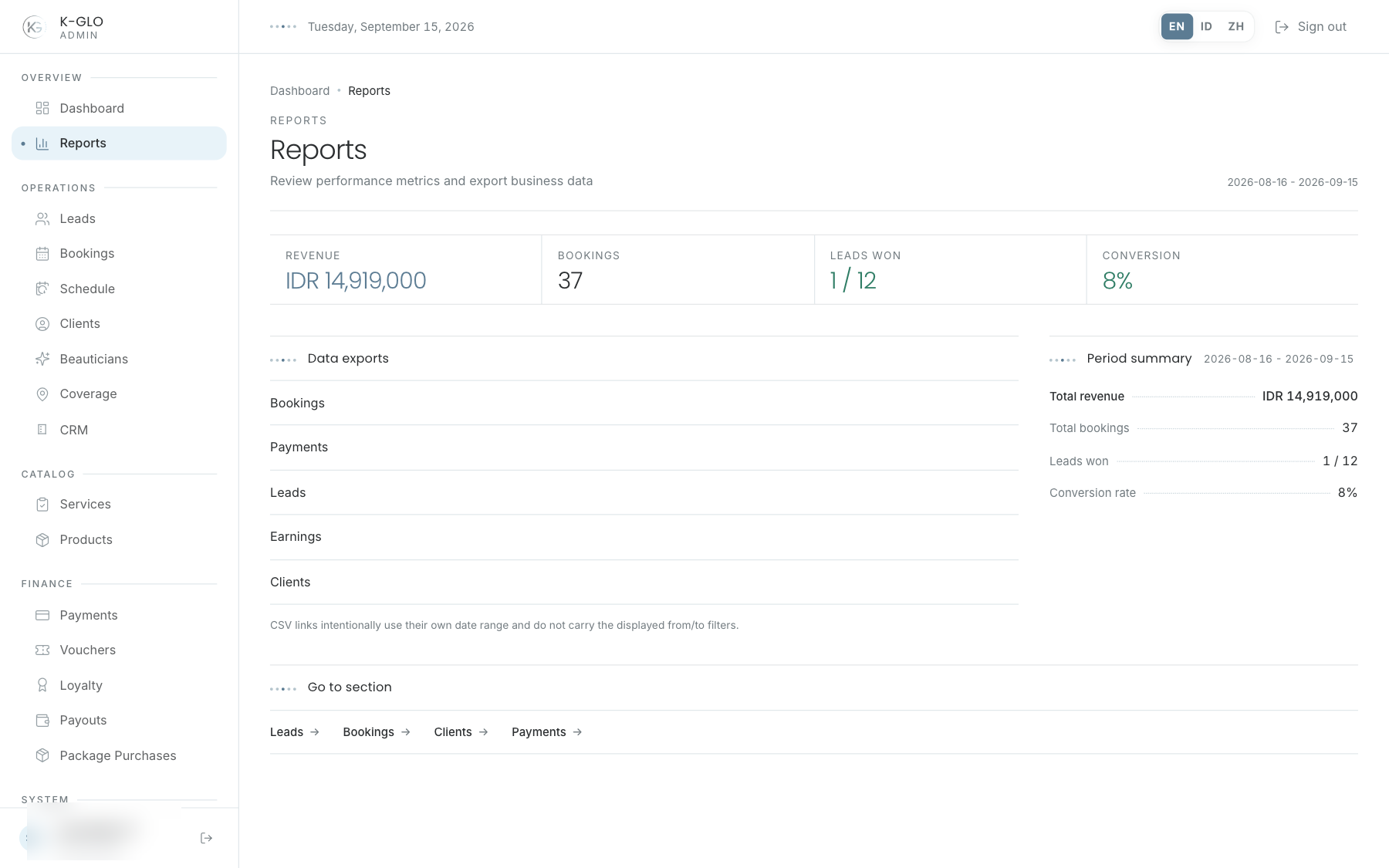
The summary displays the date range supplied by backend filters (30 days by default). The Reports page currently has no date picker or operator-facing range filter; a prepared URL may include date parameters. Each export is a separate dataset endpoint and does not automatically follow the summary.
Read KPIs
Read the period context before quoting revenue, booking count, won/total leads, or conversion. Reports supports evaluation and data needs, while Dashboard supports today’s actions.
Exports
Exports are available for bookings, payments, leads, earnings, and clients. Before downloading:
- Confirm the dataset type and required CSV columns.
- Check the displayed summary period and the period applicable to the export dataset.
- Do not assume every export uses the summary’s 30-day range.
- Store and share the file according to the company’s data classification.
Video walkthroughs
English Admin Web recordings from isolated demo data, slowed down so the steps are easier to follow. Secret values are masked. No external payment or provider delivery is performed.
Recorded:
admin dashboard renders report metrics and exports each report dataset 0:07
Covered steps
- Open the report dashboard and review its period summary.
- Click each visible bookings, payments, leads, earnings, and clients CSV link.
- Verify each export response schema, source data, and non-empty row set.
Testing boundaries
- The report dashboard has no date picker; operator-selected custom date ranges are not exercised.